Worked example: coordinating a six-intersection traffic signal corridor
Every number for the Riverside Drive corridor that ships with SigTDD as NB-Green-Wave.csv: the input file, the geometry, the phase plan, the offsets and the resulting time-distance (time-space) diagram with its northbound green wave. Follow it in the tool, then swap in your own corridor.
1. The input file
The corridor is described in one CSV, one row per signalised intersection from south to north. This is the exact file, which you can download and import, or load from the Examples list in the tool's Load menu:
No.,Name,Dist N,V N,V S,OS,A,B,C,D,E,Dir
1,Riverside Dr & Oak St,350,60,55,0,40,22,22,18,18,"NS,N,S,NA,NS"
2,Riverside Dr & Elm Ave,400,60,55,21,40,22,22,18,18,"NS,N,S,NA,NS"
3,Riverside Dr & Pine Rd,300,60,55,45,40,22,22,18,18,"NS,N,S,NA,NS"
4,Riverside Dr & Cedar Ln,450,60,55,63,40,22,22,18,18,"NS,N,S,NA,NS"
5,Riverside Dr & Birch Way,350,60,55,90,40,22,22,18,18,"NS,N,S,NA,NS"
6,Riverside Dr & Maple Ct,0,60,55,111,40,22,22,18,18,"NS,N,S,NA,NS"| Column | Meaning | Unit |
|---|---|---|
| No. | Sequence from the southern end | — |
| Name | Corridor and cross street | — |
| Dist N | Distance to the next intersection north; 0 at the last | m |
| V N, V S | Northbound and southbound design speeds | km/h |
| OS | Offset: start of this cycle after the corridor reference | s |
| A–E | Phase durations in sequence, amber included | s |
| Dir | Which through movement each phase serves: NS both, N northbound, S southbound, NA neither | — |
2. Geometry
The five links add up to a corridor of 1850 m. Cumulative distance, which is the vertical position of each signal on the diagram, is:
- #1 Riverside Dr & Oak St — 0 m
- #2 Riverside Dr & Elm Ave — 350 m
- #3 Riverside Dr & Pine Rd — 750 m
- #4 Riverside Dr & Cedar Ln — 1050 m
- #5 Riverside Dr & Birch Way — 1500 m
- #6 Riverside Dr & Maple Ct — 1850 m
Northbound design speed is 60 km/h on every link; southbound is 55 km/h. Different speeds per direction are common where grade or lane arrangement differs; the tool keeps both.
3. The phase plan
All six intersections run the same five-phase sequence, which keeps the example readable. Phase A (40 s) serves both through movements; B (22 s) is northbound only, as with a leading northbound right turn that keeps the through running; C (22 s) is the southbound equivalent; D (18 s) is the cross street and stops the corridor; E (18 s) returns to both directions. The cycle length is the sum: 120 s. Deducting the 4 s amber at the end of each green run, the usable green windows measured from each intersection's own cycle start are:
- Northbound: 0–58 s and 102–116 s (A and B run together, then E).
- Southbound: 0–36 s, 62–80 s, 102–116 s (A alone, then C, then E).
4. Offsets from travel time
The plan targets northbound progression, so each offset is the cumulative northbound travel time from Oak Street (offset 0). The arithmetic is set out in full on the offset page; the results are:
| # | Link (m) | Travel (s) | Cumulative (s) | Offset (s) |
|---|---|---|---|---|
| 1 | — | — | 0.0 | 0 |
| 2 | 350 | 21.0 | 21.0 | 21 |
| 3 | 400 | 24.0 | 45.0 | 45 |
| 4 | 300 | 18.0 | 63.0 | 63 |
| 5 | 450 | 27.0 | 90.0 | 90 |
| 6 | 350 | 21.0 | 111.0 | 111 |
In the tool the same result comes from Sequence → NB in the toolbar; the table is what that button computes.
5. Checking the wave
Send one vehicle north from Oak Street at the start of green (corridor time 0 s) at 60 km/h and record where it is, in each downstream signal's own cycle, when it arrives:
| # | Intersection | Arrives at (s) | In that signal's cycle (s) | Green? |
|---|---|---|---|---|
| 1 | Riverside Dr & Oak St | 0.0 | 0.0 | Yes |
| 2 | Riverside Dr & Elm Ave | 21.0 | 0.0 | Yes |
| 3 | Riverside Dr & Pine Rd | 45.0 | 0.0 | Yes |
| 4 | Riverside Dr & Cedar Ln | 63.0 | 0.0 | Yes |
| 5 | Riverside Dr & Birch Way | 90.0 | 0.0 | Yes |
| 6 | Riverside Dr & Maple Ct | 111.0 | 0.0 | Yes |
Every arrival lands within a second of the start of phase A, so the leading edge of the platoon never waits. The trailing edge, released 58 s later at the end of phase B, follows the same trajectory 58 s behind and also meets green throughout, which is why the northbound bandwidth is the full 59 s (49 percent of the cycle). Southbound, with these offsets, the bandwidth is 0 s: the plan favours the northbound peak by design, and a PM plan on the same corridor would reverse it.
6. The same corridor in the tool
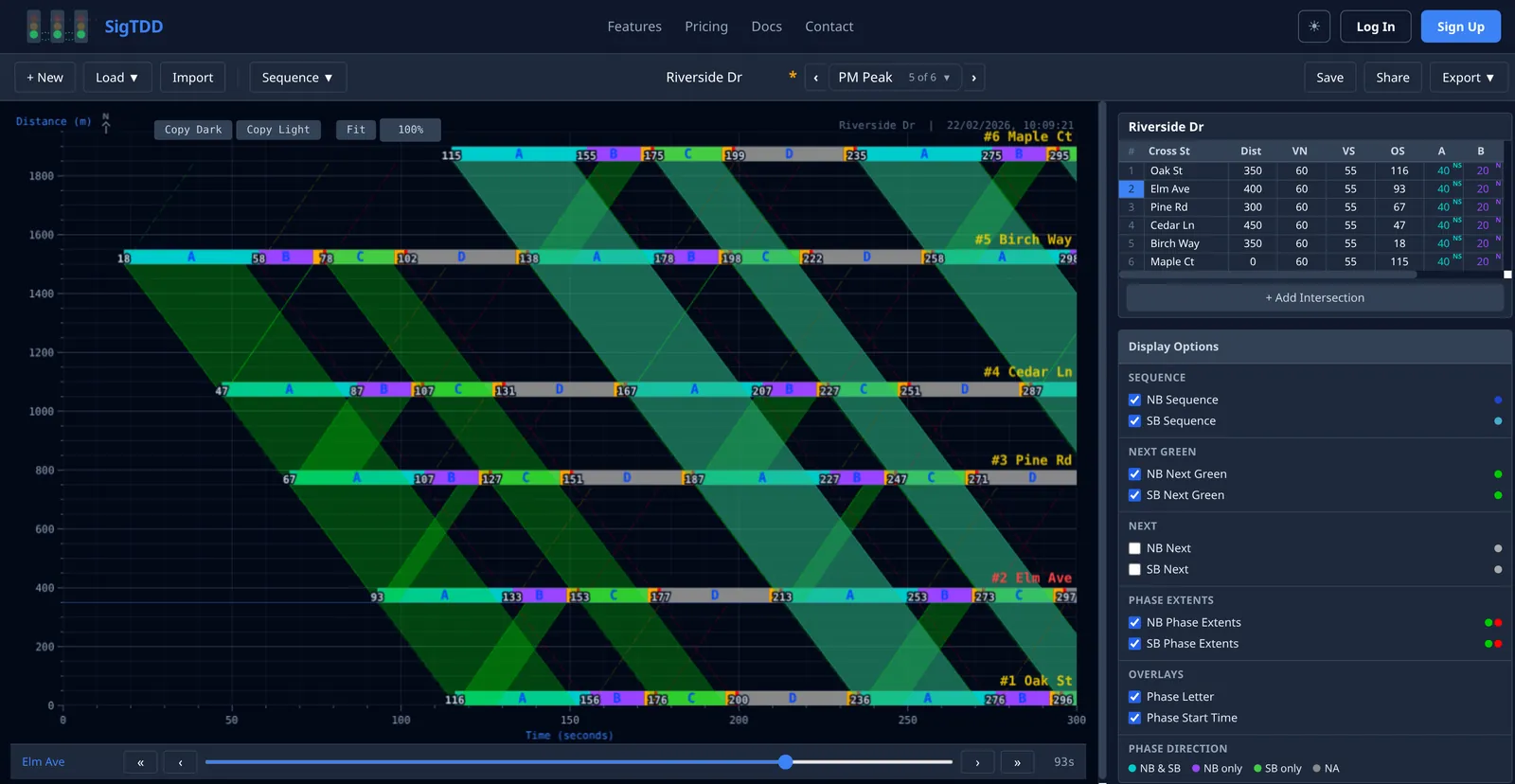
Working through it live:
- Load → Examples → NB-Green-Wave, or Import the CSV.
- Turn on NB Sequence in Display Options and turn SB Sequence off to isolate the northbound band.
- Select Elm Avenue and drag its offset away from 21 s: the band narrows immediately, then breaks. Drag it back.
- Use Sequence → SB to re-time the corridor for the southbound peak and watch the band swap sides; duplicate the plan first from the plan selector to keep both.
- Change the cycle by adding 10 s to phase A at every intersection and re-run the sequence; the offsets change because the arithmetic is unchanged but the wrap point moved.
- Save as your own corridor (a free account) to share a read-only link with a reviewer.
7. Doing it for your own corridor
Replace the CSV rows with your signals from south to north: measured stop-line spacing, the platoon speed you observe rather than the posted limit, the actual phase splits from the controller and the direction each phase serves. If the corridor exists in Synchro, the UTDF import brings the geometry and timings across. Then run Sequence for the peak direction, read the bandwidth for the other direction, and decide what the second plan should favour. The documentation covers every control used above.